
Tuesday, August 12, 2008

Express JSON as Database Table from Enterprise Data Mashup

Project Mural offers an option to express data output from Enterprise Data Mashup (EDM) Service as JSON (Java Script Object Notation).

While JSON naturally gels well with the Java Scripts, there might be a requirement to process JSON with Java Utilities.
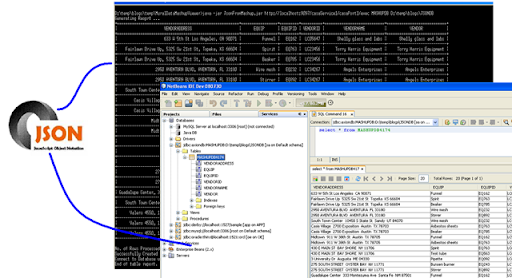
json_full_pic_blogspot

Here is a Java based JSON Parser for Project Mural Data Mashup Service that can help you do the following :

  • Visualize your JSON output from Data Mashup service more legibly as well laid table.
  • Convert JSON output into String table that can be viewed as a table into a different platform say, Mobile or a Handheld device.
  • Create Axion Database Tables with JSON data. Later use this to export data into some other database or use this into another Mashup.

You can download the JSON Viewer and the Source Code for this utility and here is how you can use it.

  1. Download and Unzip MuralDataMashupViewer.zip
  2. From MuralDataMashupViewer, Execute the Main class as follows
  3. Execute one of the following commands. Set your java path if not already done.
  • java-jar JsonFromMashup.jar <Data Mashup Service URL>
  • java-jar JsonFromMashup.jar <Data Mashup Service URL> <DBName> <DBPath>

where

<Data Mashup Service URL> : URL of your running Data Mashup Service (refer)

<DBName> : Name of the Database to be created containing JSON table

<DBPath> : Absolute path of the location where database needs to be created.

While the former expresses the JSON from service as a table on your output screen, latter also creates a database with JSON data from service that can be user with any other application. The screen shot shows JSON table created in NetBeans DataView abut JSON table expression on the user window.

Also See :

How to Build Server Side Data Mashup using Project Mural

Enterprise Data Mashup with Project Mural

Sphere: Related Content

Thursday, August 7, 2008

Get your hands dirty with Mural Hands-On-Lab

Project Mural comprehensive suite bundles components that must inter-work to help user build a functional Master Data Management (MDM) solutions.

Following are the set of core components bundled in the suite :

Being the first open source community focused on MDM, it offers participative platform for the community based development and also encourages contributions in terms of pragmatic MDM solutions based on Mural technologies.

If you wish to take a deep dive into how some of these components can build a MDM solution for you, here is the place to start ....

Mural Hands-On-Lab starts from pulling out the data from a data source and transforming/loading it to a staging area using data integrator. It also shows how a simple master index model can be build that could consume the data from the staging. The lab also highlights how cleanser and profiler can be used on the source data before it could be processed to generate indexed database.

Note that the lab content is based on current implementations. As the components are rapidly evolving, the lab content may need upgrades which will be done in the phased manner.

The hands-on-lab zip can be downloaded here.

Rich set of Mural documentation and training tutorials are also available for a quick start.

Mural Installers can be downloaded from here.

Sphere: Related Content

Thursday, July 31, 2008

NetBeans Database Explorer gets a facelift

NetBeans 6.5 will soon be witnessing a much needed change in its Database explorer capabilities which can be accessed from the NetBeans Services Tab.NetBeans-65

Database explorer, predominantly, has been a database query tool with minimal graphically supported SQL on the site. User, however, is provided with SQL interface from where SQL commands can be authored to perform database operations.

The brand new DataView NetBeans module provides many new features for existing NetBeans database explorer besides providing contemporary look and feel to the existing explorer.

Here is the concise list of some cool features that are being introduced in NetBeans 6.5 DB Explorer. The features will be available with NetBeans 6.5 Milestone 2 Release.

  1. Sort results based on a column
  2. Edit data from a query and commit changes
  3. Display number of returned records
  4. Pagination, Option to set page size
  5. Copy selected records with/without HEADER detail
  6. Generate SQL script for CREATE, INSERT, UPDATE, DELETE statements from resultset data.
  7. New records can be INSERTED in the table using a graphical panel.
  8. Delete Selected rows
  9. Truncate the table
  10. Optimized pagination for MySQL and Postgres

Apart from this, some of the advanced features like suppressing edit buttons and row editing when data is being fetched from multiple tables are part of the recent enhancements.

Also, SQL editor has been empowered by advanced features like SQL Code Completion and SQL History to enthrall the users.

Here is the glimpse of added tooling on the SQL Editor viz-a-viz the existing one.

dv_old bend_arrow

dv_new


Sun SOA/MDM team is the prime contributor of this functionality to the NetBeans design community.

If you are looking for some more details on this feature, you can get it here.

You may also like to review some more New and Note Worthy NetBeans 6.5 Milestone 2 features.

Sphere: Related Content