Sunday, August 31, 2008

Web 2.0 Style for Printed Newspapers

If you consider user participation as one of the primary ingredient of Web 2.0, Daily Newspapers in India are making a beeline on that route.  web2.0_News

Printed newspapers in India are encouraging Citizen Journalism where readers  contribute to the columns with social and civic issues, eye-opening photography and touching true experiences and stories.

The approach works wonders as it allows reporting of news right from the true source of its creation. It also reduces the load on official reporters and encourages collaboration with the common man. Typically, 5-10 percent of print seem to be originating in the hands of readers these days.

Thanks to the technology as people equipped with cell phone cameras, SMSs, PDAs with wireless Internet and mobile computing are able to catch the action live and report it on proper channel within no time.

Here are some of the interesting examples from a reputed Indian Daily ...

READER REPORTER : Crumbling Bangalore Roads

SOUL CURRY 

CITY MAILBOX

Sphere: Related Content

Online Storage : We All Need One

Online Data Storage is one of the safest ways of securing your critical data from any accidental digital loss or theft while you're on the move. This also helps to backup critical personal data and share them either selectively or publicly.  image

With plummeting cost of storage media, there are many online alternatives available that are free for use.

Blogs can use this smartly as a distribution media for artifacts that they wish to share (example).

Here is the list of some of the best known web storage sites.

Choose your data insurance policy from here ...

  • Use Your GMail account as a storage media and map it as an extension drive on your Windows Explorer. Use Option1 or Option2 for this.
  • ESnips is another good alternative. It Offers 5 GB of free storage. Allows access controls and provides widgets for rapid bulk upload to the site.
  • XDrive from AOL offers 5 GB of space free with Desktop Data backup widgets.
  • Skydrive is a offering from Microsoft with 5 GB of free storage.
  • ADrive offers 50 GB of free storage.
  • Mozy is another good alternative for Data Backups. This EMC Company offers unlimited, automatic data backups of your PC at a very small monthly expense.
  • Box.net is a paid service, however, Box Lite is available with 1 GB of free storage.
  • DropBoks offers 1 GB of free storage with uploads as big as 50MB in size.
  • AllmyData offers 1 GB of free storage.
  • OnmiDrive is a storage aggregator that brings your web and desktop files to a single storage point. It also allows editing of office documents online.
  • Openomy offers 1 GB of free data storage. It also provides developer APIs to access data in a REST-based way.
  • Filesanywhere allows you to upload and share files through email links. 1 GB is offered for free accounts.
Sphere: Related Content

Tuesday, August 12, 2008

Express JSON as Database Table from Enterprise Data Mashup

Project Mural offers an option to express data output from Enterprise Data Mashup (EDM) Service as JSON (Java Script Object Notation).

While JSON naturally gels well with the Java Scripts, there might be a requirement to process JSON with Java Utilities.

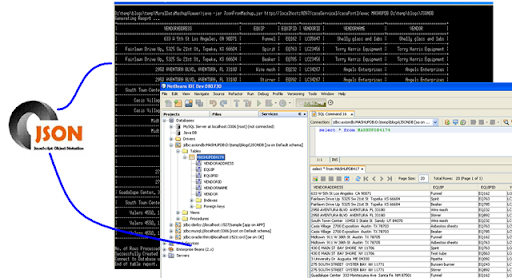
json_full_pic_blogspot

Here is a Java based JSON Parser for Project Mural Data Mashup Service that can help you do the following :

  • Visualize your JSON output from Data Mashup service more legibly as well laid table.
  • Convert JSON output into String table that can be viewed as a table into a different platform say, Mobile or a Handheld device.
  • Create Axion Database Tables with JSON data. Later use this to export data into some other database or use this into another Mashup.

You can download the JSON Viewer and the Source Code for this utility and here is how you can use it.

  1. Download and Unzip MuralDataMashupViewer.zip
  2. From MuralDataMashupViewer, Execute the Main class as follows
  3. Execute one of the following commands. Set your java path if not already done.
  • java-jar JsonFromMashup.jar <Data Mashup Service URL>
  • java-jar JsonFromMashup.jar <Data Mashup Service URL> <DBName> <DBPath>

where

<Data Mashup Service URL> : URL of your running Data Mashup Service (refer)

<DBName> : Name of the Database to be created containing JSON table

<DBPath> : Absolute path of the location where database needs to be created.

While the former expresses the JSON from service as a table on your output screen, latter also creates a database with JSON data from service that can be user with any other application. The screen shot shows JSON table created in NetBeans DataView abut JSON table expression on the user window.

Also See :

How to Build Server Side Data Mashup using Project Mural

Enterprise Data Mashup with Project Mural

Sphere: Related Content