Gartner Hype cycle is a good way to take a bird’s eye view of where the technology markets are headed in a short and medium term. Here are some interesting trends being observed :
Cloud computing is seen to have climbed to the peak of hype from 2008 and holds a promising future as increasing number of enterprises are looking at reducing “on-premise” equipment and exploiting computational power, storage and apps in the cloud. Airtel Net PC is an example of commercial adoption of the concept.
SOA seems to have arrived! Though advancing a bit slowly, but surely, its out from white boards to some productive implementation at large enterprise level. Enterprises worldwide ‘dare’ to allocate bucks on this integration approach which has been finally making sense now. Web 2.0 seems to have been following the similar trend.
Micro blogging which was emerging in 2008 has seems to be loosing its shine this year.
Video Search, which has been there for a while now, mostly in the research labs, it catching some heat.
Certain technology trends like Tablet PC, Electronic Paper, Social Network Analysis, Green IT either have stagnated or disillusioned from their promising spots.
Focus clearly has shifted from media centric trends in 2007 and 2008 to otherwise conceptually unconventional enterprise technologies.
If the complex enterprise world was synonymous with an automobile, data can be considered as the fuel revving its engines. Enterprise applications either consume or generate the data to deliver the functionality for which they are designed.
Enterprises persist data into various different source systems. Most of the organizations use standard RDBMS (i.e. MySQL, Oracle, DB2, MSSQL etc.) while some of them keep it simple by dumping data into spreadsheets, text files/csv, xml etc. There is also a considerable amount of data floating around as RSS, HTML and Emails and many more such bizarre data sources.
It can get extremely chaotic if there is a requirement to move such data between heterogeneous platforms using traditional data extraction and loading techniques. Data movement requirements can be envisaged with following few scenarios :
Database upgrades i.e. from oracle 1.x to 1.y
Database schema upgrades i.e. structural changes w.r.t. fields and tables.
Bulk loading of data from multiple and possibly heterogeneous data sources into a target database i.e. loading data into MySQL partly from DB2 and partly from Oracle
Moving data from source to target while transforming information being moved i.e. First name and Last name fields being combined from source to Full Name field in target database.
Reconciliation of information from various dynamic data sources into a data warehouse.
Simple data archival requirements.
ETL (Extract-Transform-Load) is a function of Data Integration that provides the technology for moving data between variety of such data sources. ETL technology is being provided by variety of vendors today. Each offering has some or the other uniqueness in terms of data sources it supports. Here are some of the prominent ETL products listed against vendors providing it :
Ab Initio
Adeptia [Data Tranaformation Server]
Altova [Mapforce]
Advanced ETL Processor
Barracuda Software [Barracuda Integrator]
CA [Data Integrator]
Corporator [Transformer]
CoSORT [CoSORT ETL Tools]
Crossflo Systems [Data Exchance]
DataHabitat [DH ETL]
Djuggler
Enhydra [Open Source]
Group 1 [Data Flow]
IBM [WebSphere DataStage]
iSoft [Amadea]
Ikan [ETL4ALL]
LogiXML [LogiETL]
Microsoft [SSIS]
Oracle [Oracle Data Integrator(ODI) / Oracle Warehouse Builder(OWB)]
Pentaho [Pentaho Data Integration, PDI]
Pervasive [Data Junction]
Platinum [Info Pump]
SAP/Business Objects [Data Integrator & Services]
SAS [Data Integration]
Sagent Technologies [Sagent Solution]
Solonde [Warehouse Workbench]
Sybase [Data Integration Suite & Data federation]
WisdomForce [FastReader]
Also, there are variety of Open Source ETL solutions available.
Apatar
Benetl
kJube
QXchange
Scriptella [Open Source ETL]
SUN Microsystems [SUN Data Integrator]
Teland [Talend Open Studio]
Here are some of the other prominent (Open Source) once - Browse List Here
Free/Open Source Product Software has always been a boon for Startups/Freelance Developers. Availability of quality code (for reuse or reference) acts as a catalyst in providing much needed agility that small enterprises need. This not only saved time to market but also saved lots of moolah that would ,otherwise, be spent on buying costly licensed products. However, “can you monetize freely available source code?”, is a question I am trying to analyze ?
When you think free software, think as in free speech,not as in free beer.
Users can exercise following freedom with the free software :
Freedom to run/execute the program for any purpose.
Freedom to study how the program works and adapt it to your needs.
Freedom to redistribute copies with friends, colleagues and community.
Freedom to enhance/improve the product code and release it for commercial use.
Free software does not mean non-commercial. A free program must be available for commercial use, commercial development, and commercial distribution.
What is an Open Source software ?
Almost all open source software is a free software and vice-versa. Like free software, open source software providers ensures that source code is available for the users to run/execute, study,redistribute, enhance and improve the software.
So where is the difference ?
Free software license (most commonly GNU GPL) ensures that any redistribution, enhancement or improvement to the source code is available (mandatory) along with the commercially available executables built out of modified code. This ensures passing all the benefits to the community no matter how the original software was used.
On the contrary, Open Source license (most commonly SUN CDDL) advocates redistribution of software on similar lines as GPL except that it does not make it mandatory to release the enhanced/improved code along with executables built out of modified code. This, to some extent, may stem the community contribution making source code more viable for repackaging into a commercially available proprietary products.
Thus, both Free and Open Source software can be sold and monetized as long as you abide by license agreement under which they exist.
QoS (Quality of Service) has to be delivered. Organizations worldwide have already identified and mastered this to sustain in the customer centric markets of today. QoE(Quality of Experience), however, has been fast maturing and taking over QoS (Quality of Service) as a key differentiator.
Organization wide indexing of customer data helps the enterprise deliver QoE by uniquely identifying customers across various functions of the business. They also allow customer centric collaboration between integrated business models thus driving QoE along with QoS. This can be very simply understood as described below :
Jerry is a frequent flyer and often needs to dial-a-cab "Cool-Cabs" service for the Airport. He needs to provide his Name, Address and Telephone number along with the time when the cab is required and the cab is always at the doorstep well in time. Jerry is happy with this service.
Due to Christmas season rush, all "Cool-Cabs" were booked and Jerry tried calling another similar cab service named "Super-cool-cabs" this time. On placing the call from his mobile, Jerry was identified and greeted with his first name, his address was promptly identified and confirmed and the cab was booked in less than 30 sec. Jerry was awestruck when the cab arrived with a morning copy of his favorite newspaper with a personalized welcome note stuck on it.
Later, on inquiring how this was made possible, Jerry learns that "Super-cool-cabs" service was apparently run by the same "Baron-business-group" that owns a popular book store in the city where he usually picks up a copy of this daily newsprint. Baron maintains the master index of its customers and leverages the same in all its spread out customer centric businesses.
"Super-cool-cabs" service turned out to be as efficient as "Cool-Cabs" service and Jerry, a new customer, was WON!
SUN Master Index Studio provides the capability to create any domain specific master index through the matching, de-duplication, merging, and cleansing of data from various data sources.
Project Mural is an open source MDM (Master Data Management) solution from SUN.
The Enhanced SUN Data Integrator lays foundation stone for providing a platform that would facilitate data movement virtually between wide variety of data sources and targets.
Typically Enhanced Data Integrator would work in three different modes :
Basic ETL Mode : Data movement from a relational source to a relational target database.
Advanced ETL Mode : Data movement from any data source (File and JDBC) to a relational data target. This also supports generation of staging database for injecting data into SUN MDM Projects (Project Mural).
Bulk Loader Mode : Supports data loading for delimited files having well replicated relational targets. This is typically useful for loading indexed data (from project Mural) into its target schema/database.
To get the flavor of this, here are couple of videos from the Enhanced SUN Data Integrator bean bag that demos basic and advanced data integrator modes :
SUN Data Integrator - Basic ETL
SUN Data Integrator - Advanced ETL
Enhanced SUN Data Integrator projects can be created with Glassfish ESB RC1 builds under SOA catagory. You can download the installer here
SUN Data Integrator (SUN ETL), is getting ready to be even more user friendly with its revamped wizard experience from NetBeans IDE.
The new experience will provide users with an option to craft ETL (Extract – Transform - Load) collaborations from data residing in disparate data sources like flat-files, csv-files, spread sheets (XLS) and relational database tables. It would also support sourcing data from RSS feeds and some simple HTML web tables. User will be able to craft ETL collaborations by selecting combination of such data sources and moving source data to some target database.
Wide variety of relational databases are supported by SUN Data Integrator of which some of the common once are MySQL, Microsoft SQL Server, Oracle, Derby, PostgreSQL etc.
SUN Data Integrator can run as a JBI service (JSR 208 compliant) on the Glassfish Application Server thus enabling Data Integration/ETL as a SOA enabled service. It is also one of the key component for Project Mural (SUN MDM Suite) where it facilitates raw data loading from source systems into the MDM infrastructure. It is also used for loading indexed data (from MDM Project ) to its targeted database platform.
The Enhanced ETL projects also supports generating portable/re-useable ETL packages which could be used/re-used from command-line for simultaneous data loading from various distributed host machines to a specified target database.
Here is how the integrated story would look like :
SUN Microsystems fared up 19th (read top 20) in Best employers survey for the year 2008. People voted in favor of Work-Life Balance as the top criterion for their sustained loyalty towards their respective employers.
According to research firm IDC and Dataquest, with the growing average experience in this relatively young software industry, work-life balance seems to be getting one of the top reasons in terms of employee satisfaction followed by compensation and benefits, growth opportunities, overseas exp. and location of the company to state a few.
Having personally witnessed, SUN Microsystems in India keeps its employees motivated at work by embedding work-life balance tactics into its internal policies. The company encourages telecommuting and pays out internet charges used for official purpose. Office wide WIFI, break out rooms, flexible work timings ensure employees are not tied down to their desk and can work from the corner of their comfort. New to the list are employee wellness initiatives through which company pays its employees to sweat out at a GYM of their choice. The open culture at this open source software company justifies the ranking its awarded. Congratulations SUN !
Sphere (now an AOL subsidiary), provides a novel way of linking blogs with contextually relevant content from the web.
You could virtually spin your site as an information hub for your readers by embedding your blogs with Sphere widgets. The approach is bi-directional. Your readers get to read more on the topics that you publish and your blogs get listed into related searches on other blogs.
This synergy helps a great deal to enhance site interaction which results in acquiring new readers.
... de facto, MDM is about the business. Its about improving the business processes.
This is what Tony Fisher, President and CEO of DataFlux says in response to one of the CIO.com articles that said that 89% of MDM initiatives are started with the notion to rectify inadequacies of data-management infrastructure.
He said, MDM strategy should start with identifying what business problem is being solved followed by streamlining business processes that are part of this problem. Starting with rectifying data is like starting on the wrong side which will just lead to building another data silo, this time called "MDM".
This is an interesting take on MDM and you can read the full article here.
DataFlux is a prominent MDM vendor that sells Data Governance, Data Quality and Master Data Management solutions.
Delicast is the directory of the streaming media freely available on the Internet. With this, your could quickly locate your favorite international radio and live international television channel and play it in the media player on your desktop.
The site is multilingual and displays the country specific channel listings.
So next time when you are traveling abroad and need to catch up with telecast on your national television, keep this handy!
Google Chrome, an open source browser from Google, became available for downloads today. It must be just a few minutes past the moment that I noticed a link on Google search page and downloaded the brand new browser.
Here are some of the key differentiators :
Its based on the theme which Google does the best .. Search!!
Browser has a combined search and address bar. Browser starts suggesting possible addresses as user starts entering web links or search strings.
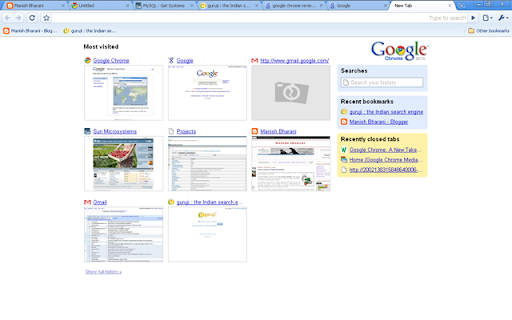
Each new tab that opens on the browser provides a snapshot of most visited sites, book marks and recent searches.
User can search the browsing history instead of looking for it in the drop-down list. Also, users can use incognito window for private browsing where no browsing history is registered.
The tabs on the parent browser window can be pulled in and out to form separate windows or tab groups.
Each browser tab works as an independent process which means that if a site crashes on one tab, it would leave rest of the tabs intact while bringing down the tab on which a site crashed !!
The browser has softness of Apple's Safari and a punch on Mozilla's Firefox. It can inherits the configuration from the installed browser.
Here is some more info of interest ....
Its an open source browser !
It uses components from Apple's WebKit and Mozilla's Firefox.
Beta released is for windows, Mac and Linux versions would gradually follow
Its build over V8, a more powerful java script engine!
With a simple yet winning look and feel, its a browser that you would certainly like to try and decide like other Google products.
If you consider user participation as one of the primary ingredient of Web 2.0, Daily Newspapers in India are making a beeline on that route.
Printed newspapers in India are encouraging Citizen Journalism where readers contribute to the columns with social and civic issues, eye-opening photography and touching true experiences and stories.
The approach works wonders as it allows reporting of news right from the true source of its creation. It also reduces the load on official reporters and encourages collaboration with the common man. Typically, 5-10 percent of print seem to be originating in the hands of readers these days.
Thanks to the technology as people equipped with cell phone cameras, SMSs, PDAs with wireless Internet and mobile computing are able to catch the action live and report it on proper channel within no time.
Here are some of the interesting examples from a reputed Indian Daily ...
Online Data Storage is one of the safest ways of securing your critical data from any accidental digital loss or theft while you're on the move. This also helps to backup critical personal data and share them either selectively or publicly.
With plummeting cost of storage media, there are many online alternatives available that are free for use.
Blogs can use this smartly as a distribution media for artifacts that they wish to share (example).
Here is the list of some of the best known web storage sites.
Choose your data insurance policy from here ...
Use Your GMail account as a storage media and map it as an extension drive on your Windows Explorer. Use Option1 or Option2 for this.
ESnips is another good alternative. It Offers 5 GB of free storage. Allows access controls and provides widgets for rapid bulk upload to the site.
XDrive from AOL offers 5 GB of space free with Desktop Data backup widgets.
Skydrive is a offering from Microsoft with 5 GB of free storage.
Mozy is another good alternative for Data Backups. This EMC Company offers unlimited, automatic data backups of your PC at a very small monthly expense.
Box.net is a paid service, however, Box Lite is available with 1 GB of free storage.
DropBoks offers 1 GB of free storage with uploads as big as 50MB in size.
Project Mural offers an option to express data output from Enterprise Data Mashup (EDM) Service as JSON (Java Script Object Notation).
While JSON naturally gels well with the Java Scripts, there might be a requirement to process JSON with Java Utilities.
Here is a Java based JSON Parser for Project Mural Data Mashup Service that can help you do the following :
Visualize your JSON output from Data Mashup service more legibly as well laid table.
Convert JSON output into String table that can be viewed as a table into a different platform say, Mobile or a Handheld device.
Create Axion Database Tables with JSON data. Later use this to export data into some other database or use this into another Mashup.
You can download the JSON Viewer and the Source Code for this utility and here is how you can use it.
Download and Unzip MuralDataMashupViewer.zip
From MuralDataMashupViewer, Execute the Main class as follows
Execute one of the following commands. Set your java path if not already done.
java-jar JsonFromMashup.jar <Data Mashup Service URL>
java-jar JsonFromMashup.jar <Data Mashup Service URL> <DBName> <DBPath>
where
<Data Mashup Service URL> : URL of your running Data Mashup Service (refer)
<DBName> : Name of the Database to be created containing JSON table
<DBPath> : Absolute path of the location where database needs to be created.
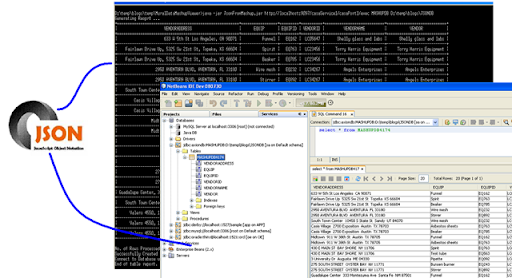
While the former expresses the JSON from service as a table on your output screen, latter also creates a database with JSON data from service that can be user with any other application. The screen shot shows JSON table created in NetBeans DataView abut JSON table expression on the user window.
If you wish to take a deep dive into how some of these components can build a MDM solution for you, here is the place to start ....
Mural Hands-On-Lab starts from pulling out the data from a data source and transforming/loading it to a staging area using data integrator. It also shows how a simple master index model can be build that could consume the data from the staging. The lab also highlights how cleanser and profiler can be used on the source data before it could be processed to generate indexed database.
Note that the lab content is based on current implementations. As the components are rapidly evolving, the lab content may need upgrades which will be done in the phased manner.
NetBeans 6.5 will soon be witnessing a much needed change in its Database explorer capabilities which can be accessed from the NetBeans Services Tab.
Database explorer, predominantly, has been a database query tool with minimal graphically supported SQL on the site. User, however, is provided with SQL interface from where SQL commands can be authored to perform database operations.
The brand new DataView NetBeans module provides many new features for existing NetBeans database explorer besides providing contemporary look and feel to the existing explorer.
Here is the concise list of some cool features that are being introduced in NetBeans 6.5 DB Explorer. The features will be available with NetBeans 6.5 Milestone 2 Release.
Sort results based on a column
Edit data from a query and commit changes
Display number of returned records
Pagination, Option to set page size
Copy selected records with/without HEADER detail
Generate SQL script for CREATE, INSERT, UPDATE, DELETE statements from resultset data.
New records can be INSERTED in the table using a graphical panel.
Delete Selected rows
Truncate the table
Optimized pagination for MySQL and Postgres
Apart from this, some of the advanced features like suppressing edit buttons and row editing when data is being fetched from multiple tables are part of the recent enhancements.
Also, SQL editor has been empowered by advanced features like SQL Code Completion and SQL History to enthrall the users.
Here is the glimpse of added tooling on the SQL Editor viz-a-viz the existing one.
Sun SOA/MDM team is the prime contributor of this functionality to the NetBeans design community.
If you are looking for some more details on this feature, you can get it here.
Here is step-by-step write-up on how SUN's Open Source Master Data Management (MDM) Suite can be used to build Server Side Data Mashupwithout practically writing any code!
Please note that Data Mashup technology at SUN is being constantly evolved even as you are reading this blog. Intent of this write up is to give readers a detailed peek into existing capabilities and what it could offer when made available in the coming Mural releases.
Here's the use case to aid the concept being explained ...
Sandra owns a small laboratory equipment shop in Denver. Her suppliers have levied a 2% additional tax on the transportation cost which varies based on the distance of delivery. (gas is expensive and nothing is free). Sandra is looking out to optimize her profit margins by sourcing more from near by dealers. She needs a service that gives her distance of delivery of her suppliers. She has her supplier data on a spread sheet and she is able to Google out delivery point address of all lab equipment vendors in the US from Internet (each with unique state allotted vendor ids). Lets see how data mashup can help her with the cost cutting mission.
Prerequisites 1. NetBeans IDE
2. Glassfish App Server
3. SUN Data Integrator and SUN Data Mashup Service Engine (JBI Runtime)
4. SUN Data Integrator and SUN Data Mashup Design time environment NetBeans Modules
Step 1: Identify your data sources
There are two data sources involved here.
Spreadsheet (Data format available with Sandra)
A text file with csv data (Data from Internet)
Step 2: Create Mashup Database
Launch your NetBeans IDE
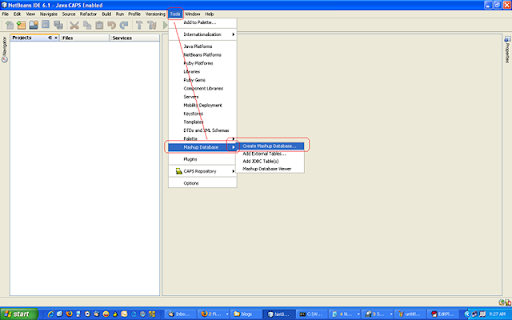
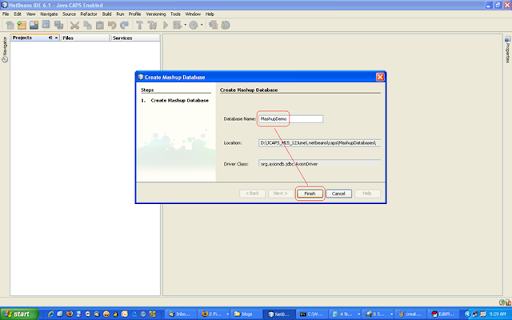
Go to Tools --> Mashup Database --> Create Mashup Database.
Name the database appropriately for the project/service it serves. Say Finish. A success message confirms that the database was created successfully.
Step 3: Add External table (Spread Sheet) to the created mashup database
As the database involved here is non-relational, data needs to be staged into a relational database so as to use it into a federated data pool.
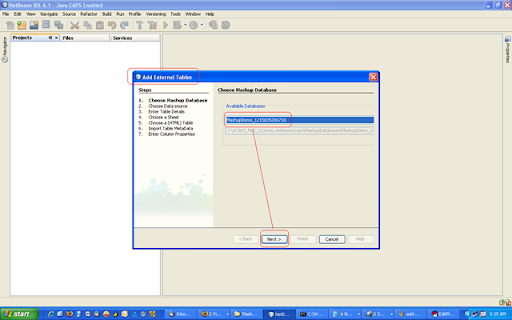
Go to Tools --> Mashup Database --> Add External Tables ...
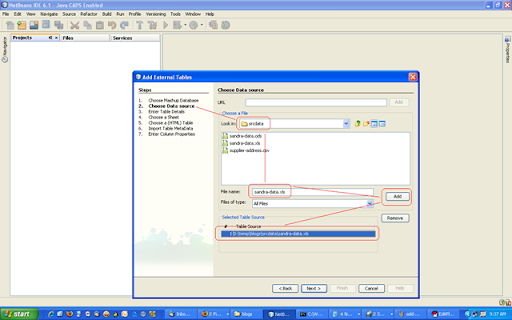
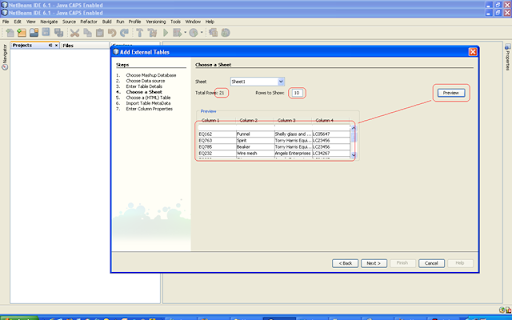
Add the spread sheet data into the mashup database
Browse to the xls folder and select the file. Add it into Selected table list.
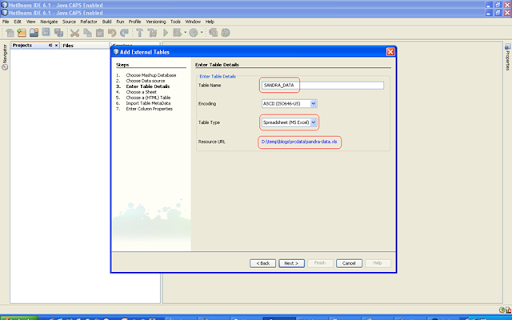
Ensure that correct table type is listed by verifying the highlighted blocks.
Preview the data and say next.
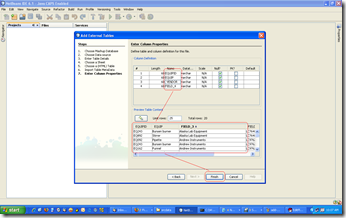
Edit the column properties by double clicking on the column fields in the table. Press enter when done. The changes get reflected in preview table window.
Press Finish and look out for success message to confirm that the table was added.
Step 4: Add External table (Text File) to the created mashup database
As the database involved here is non-relational, data needs to be staged into a relational database so as to use it into a federated data pool.
Go to Tools --> Mashup Database --> Add External Tables ...
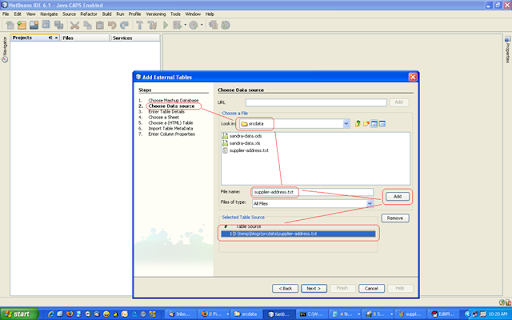
Add Text file (delimited) data into the mashup database
Browse to the folder with text file. Select and add it into table list. Go to Next.
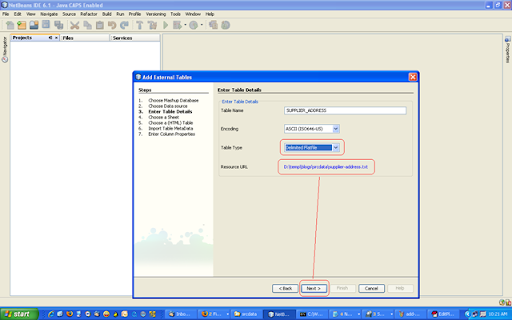
Ensure that correct table type is listed by verifying the highlighted blocks.
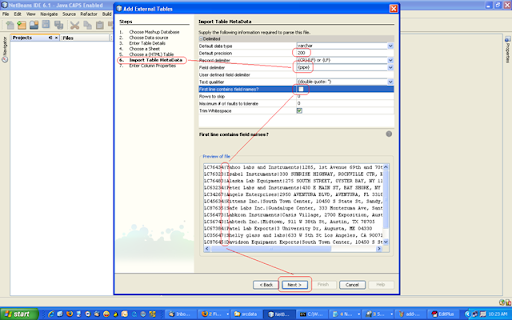
Change the table Metadata properties like default precision, delimiter etc suitable for file setting. Preview if the data in the text file is parsed properly and say 'Next'.
Change the default column names to some appropriate names. Say Finish.
Look out for success message to confirm that the table was added.
Step Verification
Verify that the database was created in the NetBeans Services Tab with tables and columns.
Right click on the table and 'View Data' to see if the data from spread sheet and CSV file in available in the database.
Step 5: Creating Mashup Project using NetBeans
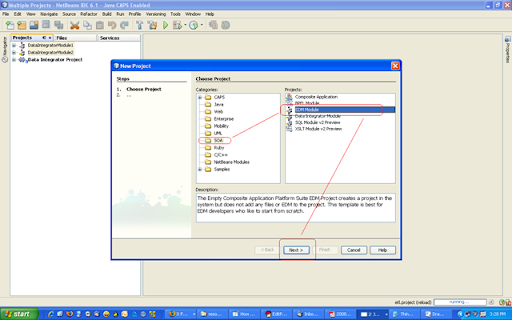
On the NetBeans menu, go to File --> New Project --> SOA --> EDM Module --> Next
Name your mashup project and select the location where you want the project to be created. Finish the wizard.
Observer the Mashup project being created at the specified location. Project also shows up as active project on the NetBeans projects tab
On the NetBeans Project tab, browse to the Mashup Project (SandraEDMApp for this demo). Right click on the 'defaultpackage' node and select New --> Others --> SOA --> EDM --> Next on the pop-up.
Name the EDM file (SandraEDM for this project ) and Finish the wizard. A blank canvas is created on the active NetBeans window. Also, observe that SandraEDM.edm is created under default package of your SandraEDMApp project.
Step 6: Creating Data Join
Till the previous step, we have achieved bringing the diverse data into a common staging area. In order to create federated view, data in the staging tables need to be federated. Here is how it can be done by creating data joins.
From the NetBeans palette, drag-and-drop the join operator on the mashup canvas.
Create New Join View editor comes up on this action.
Press "All" button on the editor to join all the tables. Note that join preview gives an option of editing join types i.e. inner, outer etc.
Select OK to finish the wizard. Canvas will be added with additional root join widget.
Open Properties panel on NetBeans and select Root Join Widget by clicking over it.
Edit the join condition by edit button on Join condition property.
For this case join condition is (SANDRA_DATA.VENDORID = SUPPLIER_ADDRESS.VENDORID) where vendorid was the Licence Id for the vendor.
Do not forget to insert the Runtime Input Argument into the mashup design. You can insert the argument (arg_0 which is the default value) as shown below.
Save the project. Right click on the project and select Build Project. Observer that SandraEDM.wsdl is created below in the project node.
Your Data Mashup is ready to be deployed as a service !!
Step 7: Deploy Data Mashup in Glassfish App Server
To create a composite application, go to NetBeans files menu. Under Files, select --> New Project --> SOA --> Composite Application -- Next.
Select Project Location and Name for the Composite Application Project. For this project, name being selected is SandraEDMCompApp.
Select Finish. Observe that the Composite App project is created on the NetBeans Projects tab. Also observer that a casa (composite application service assembly) editor opens up in the NetBeans.
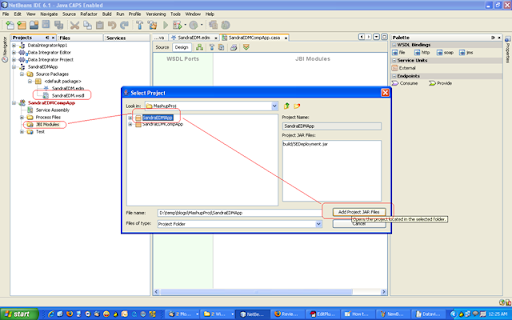
Now add Mashup Application to the JBI modules of the composite app. Right-click on the JBI Modules and select Add JBI Module.. from the list. Select SandraEDMApp project in the list shown and say Add Project Jar File. Observe EDM app being added as JBI Module in the Composite App.
From the casa editor palette, drag and drop the HTTP WSDL bindings into the editor and build the comp app once. An end point for connection to SandraEDMApp comes up on the editor.
Connect the HTTP consumer endpoint to the SandraEDMApp endpoint.
Build the Composite App project once again.
Step 8: Tweaking the Composite App wsdl
* Note that this step would eventually be removed but this is what is needed for now.
Double click and open the wsdl generated in SandraEDMCompApp --> Process files --> SandraEDMCompApp.wsdl
Here is how to tweak the wsdl :
Include part into node <http:operation location="(part)"/>
change <http:urlEncoded/> to <http:urlReplacement/>
Change the http service url to include a concerete port instaed of the default port from where mashup service can be accessed i.e. replace ${HttpDefaultPort} with <available port no on the host>. For this project, I am using 9097
Right click on the Composite Application project and Deploy the Application. Look for the success message and verify the same on the Glassfish Application Server.
where 129.158.238.222 is the ip address of the host running the service.
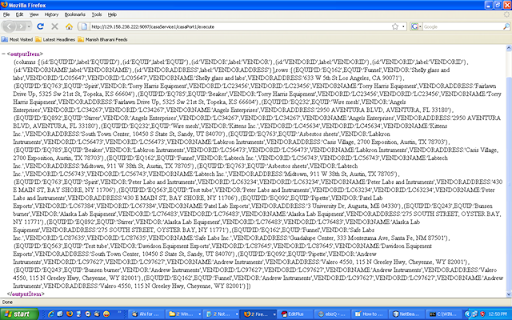
Observe that the federated view of the data in two different data sources is reported in JSON format.
Note that the output data format can be changed to xml or webrowset by changing mashup-engine properties and redeploying the same into Glassfish JBI services.
Step 10: Using the Data from Mashup Service
The JSON output from the service can be parsed using standard JSON parsers in any application. The Vendor addresses can be parsed and fed into a Google Locator service and approximate distance to business addresses can be fetched. Based on this, Sandra (hope we still remember her !) can get some crucial insight about sourcing her business from near-by vendors. By the virtue of being a JBI service, data can also be sent over to other services using SUN Enterprise Service Bus.
Database files used to create this Mashup can be downloaded from here.
It is often desirable to have a desktop utility that could generate PDF out of documents that you read in various formats or share them with your team.
Here is an open source utility that you could download and install that does this job just right!
PDF Creator installs itself on your windows machine just like any other printer on your network. Thus, when you print, the printable content (document, web page, image etc.) gets converted into pdf document and can be saved to your file system.
Of course, Open Office also provides you with a pdf generator for the documents that you can open there but PDF Creator does it like a breeze!
If I have to explain data mashup to someone in the simplest terms, here is what I would say ...
When data from more than one data source (can be heterogeneous sources i.e. RSS, HTML, Spread Sheet, RDBMS , Flat Files, Web Services etc.) is federated and integrated into a single application which can be exposed as a web-service, a Data Mashup is said to have been created. The mashup service created in such a way can be of a completely different character vis-a-vis services or sources that contributed data into this mashup. In other words, data mashup potentially can offer a completely different brand of service by the virtue of federated data that could make the available data more meaningful for the end user.
Broadly speaking, data can be federated into a mashup either on the client side as is done by Yahoo Pipes or it can be done on the Server Side using Open Data Services components from Project Mural
Project Mural offers support for building Server Side Data Mashup. Being fully integrated with NetBeans IDE, it allows syndication of data from various enterprise level data sources and exposes it as a web service. Data Mashup Service engine is a JSR208 (JBI) compliant service that can be deployed in the Glassfish application server. NetBeans also provides for complete graphical support for editing SQL joins between the federated data tables and also supports orchestration of service using BPEL editor.
Project Mural Data Mashup can be build using all Netbeans supported relational data sources. Apart from this, it also supports non-relational sources like Spread Sheets, Flat Files, HTML, RSS and XML by creating relational mappings using the user friendly wizards.
Information provided by the Mashup service is in JSON,XML and WebRowSet format currently. This data can be placed on the enterprise service bus using Open ESB components. Plenty of cool features are planned around this effort in Project Mural in the coming releases.
Stay Tuned and Watch out for more in this category ....
Project Mural is yet another ambitions offering from SUN that was formally announced to the community somewhere in the beginning of June '08 along with the availability of Java CAPS 6.
With this, SUN becomes the First open source MDM software vendor to offer gamut of functionality that empowers various transformational initiatives like CDI (Customer Data Integration), PIM (Product Information Management), Building data services using SOA and creating Enterprise Data mashups.
The suite offers variety of functionality under the single hood. Data management capabilities such as ETL (Extract - Transform - Load), Data Quality (Rules based profiling and cleansing), Matching, Standardization/Normalization, Single entity view generation (called Master Data) from variety of distributed data sources, generation of federated data queries using data mashups are some of it to name a few.
MDM Suite leverages the infrastructure of well established communities like NetBeans, GlassFish and OpenESB as seen in the poster.
The initiatives directly affect the enterprise bottom line by providing indexed, de-duplicated view of distributed data which is cleansed of human errors and free of anomalies.
A lot can be read about it on the following official links.